top of page

TUDI Aman
TUDI Aman utilizes RFID Technology to minimize losses and protect your assets seamlessly.

Hardware Installation
1
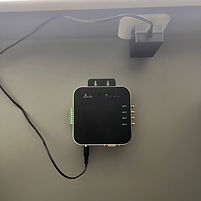
Connect the TUDI FXR UHF device to a power source using the provided power cable.
2
Attach the TUDI Wide-A Antenna to the antenna port on the device. Ensure that the coaxial cable is securely connected to the antenna.


3
Connect the buzzer or alarm to the GPIO port on the TUDI FXR UHF device.

4
Ensure the IP Camera is accessible so that the DERAS system can capture images in case of missing items.

5
Connect the Ethernet cable to enable internet access.

6
Mount the reader in the desired location using the provided bracket. Refer to the installation guide images if needed.

Software Installation
1
Run the “Deras.exe” application that has been provided.

2
Enter the user ID and password that have been given.

3
Ensure that the PC/Laptop is connected to the same network as the TUDI FXR UHF device.

4
Register the RFID tag and make sure the data is correctly recorded.

5
Perform a test by passing one RFID tag through. If you hear a sound, the installation process is complete.

bottom of page